Build Your Own Taste Skill: Turn Your Design Preferences Into Reusable AI Rules
A hands-on workshop to convert your personal design taste into a /taste-skill command. By the end, Claude will generate UI that looks like yours, not like everyone else's.
Why a taste skill, not just a CLAUDE.md
A CLAUDE.md is scoped to one project. A skill lives in ~/.claude/skills/ and works everywhere. When you type /taste-audit in a client project, a side project, or a throwaway prototype, the same rules apply.
Your taste is yours. It should travel.
Taste is not one-off. The same preferences show up in every project you touch. Encode them once and stop re-explaining them every time you open a new repo.
This guide is a workshop. You work through five exercises and end with a real file at ~/.claude/skills/taste/SKILL.md that you can use tomorrow.
What you will build
By the end of the workshop you will have:
- A named personal taste skill at
~/.claude/skills/taste/SKILL.md - A list of your 5 strongest design rules
- A list of your 5 anti-rules (things you never want to see)
- A scorecard so Claude can rate its own output against your taste
- A slash command (
/taste) you can invoke in any project
Exercise 1: Name your taste
Before you write any rules, you need a name for what you are encoding. Names force specificity.
- Warm minimal (editorial, quiet, typographic)
- Industrial utilitarian (mono, monochrome, system-terminal)
- Soft tactile consumer (rounded, warm pastels, friendly)
- Deconstructed editorial tech (asymmetric, high-contrast, intentional)
- Swiss brutalist (grid-heavy, bold type, restraint)
- Something else, named in 2–4 words
Write your name at the top of a blank text file:
# My taste: Warm minimal editorialYou are going to spend the rest of the workshop filling out the file under this name.
If you cannot name your taste in 2–4 words, you do not have a taste yet. You have preferences. Names force you to pick.
Exercise 2: Write 5 rules
Pick 5 rules that are non-negotiable for you. One per category. Be specific. Use numbers and hex codes where possible.
Template to copy:
## My 5 rules

### Color
- [Exactly what is allowed, with hex codes]
- Or, if you have a design system: paste your design tokens JSON below and add the rule "use only these tokens, never raw hex"

### Typography
- [Exactly what fonts, weights, sizes]

### Spacing
- [Exact scale in pixels]

### Motion
- [Exact allowed animations]

### Copy tone
- [Exact voice rules: person, punctuation, sentence length, forbidden words]
A note on the Color section. If you have a design system, the rule is not a hex list. The rule is “use only the tokens, never one-off hex.” Paste the tokens themselves so Claude can see what is allowed, and let the rule do the gating.
Example filled in (warm minimal editorial, no design system):
## My 5 rules

### Color
- Background: #FBFBF9 (warm white)
- Text: #141414
- Muted: #787774
- Accent: #4466FF (links and primary buttons only)
- No other colors. Never.

### Typography
- Headlines: Times New Roman or GT Sectra, weight 400, tracking -0.02em
- Body: Inter, 15.5px, line-height 1.8
- Maximum 3 sizes per page: 56 / 17 / 13

### Spacing
- Scale: 4, 8, 16, 24, 48, 96, 120.
- Section spacing: 120px desktop, 80px mobile.
- Card padding: 24px.

### Motion
- Level 0 default. Level 1 on buttons only.
- 150ms ease-out on all transitions. Opacity 0.7 only.
- No scroll-triggered animations. Ever.

### Copy tone
- First person singular. "I built this" not "We built this".
- No exclamation marks. No em dashes.
- Sentences under 20 words.
- Headlines are statements.
- Never use: leverage, unlock, empower, supercharge, revolutionize, seamless.
Example filled in (same taste, but with a design system):
## My 5 rules

### Color
- Use only the tokens below. Never raw hex. Never one-off colors.
- Accent token is for links and primary buttons only.

```json
{
  "color": {
    "background": { "value": "#FBFBF9" },
    "surface":    { "value": "#FFFFFF" },
    "text":       { "value": "#141414" },
    "muted":      { "value": "#787774" },
    "accent":     { "value": "#4466FF" },
    "border":     { "value": "#E8E5DE" }
  }
}
```

### Typography
- Use only the tokens in `typography.json`. Never raw font names or sizes.
- Maximum 3 sizes per page from the scale.

(...rest of the file follows the same pattern: link or paste tokens, then add the rule that gates raw values)
If your design system is already in Style Dictionary, Tokens Studio, or a Figma Variables export, drop the JSON in directly. Claude reads the structure and uses it as the source of truth. The skill enforces the gate.
The rules should be so specific that a stranger could apply them and produce output that looks like yours.
Exercise 3: Write 5 anti-rules
Anti-rules are more important than rules. Every AI-generated site looks the same because the defaults are loud. Your anti-rules turn the defaults off.
Template:
## My 5 anti-rules (things I never want to see)

1. [Pattern I hate #1]
2. [Pattern I hate #2]
3. [Pattern I hate #3]
4. [Pattern I hate #4]
5. [Pattern I hate #5]
Example:
## My 5 anti-rules

1. No gradients. No glow. No colored shadows.
2. No border-radius above 4px. No rounded-full on containers.
3. No abstract 3D objects in the hero. No particle systems, no orbs, no blobs.
4. No scroll-triggered entrance animations. Nothing fades up when I scroll.
5. No "we" language. No "revolutionize". No "seamlessly". No stock SaaS copy.
Anti-rules are where your taste becomes visible. Anyone can say they like minimal design. Only you can say “I refuse to use border-radius above 4px.”
Exercise 4: Write a scorecard
A scorecard is how Claude audits its own output after generating. This turns your taste from “rules I hope are followed” into “rules that get checked every time.”
Template:
## Scorecard

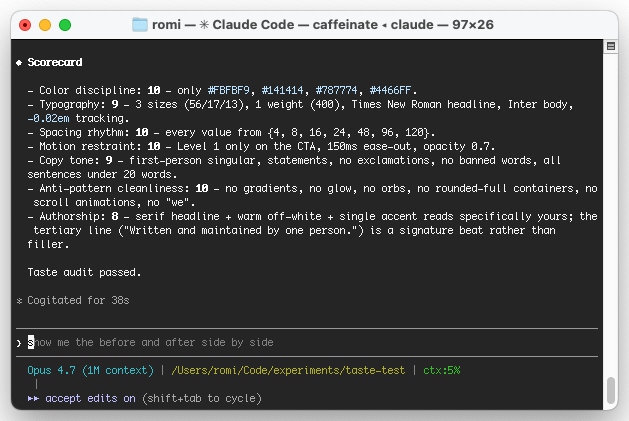
After generating any page, section, or component, rate it 0–10 on each dimension.

- Color discipline: Did every color come from the approved palette?
- Typography: Max 3 sizes, max 2 weights, correct font for each role?
- Spacing rhythm: Did every value come from the spacing scale?
- Motion restraint: Did the output stay at the approved motion level?
- Copy tone: First person, no buzzwords, statements not teases?
- Anti-pattern cleanliness: Zero hits on the anti-rules?
- Authorship: Does at least one element feel specifically mine, not generic?

If any dimension scores below 8, fix the issue and re-score before marking the work complete.
The scorecard forces self-review. Claude reads it, applies it, and tells you where the output fell short. You stop having to eyeball every generation.
Exercise 5: Compile the skill
Now you assemble all four pieces into one SKILL.md file.
Step 1: Create the folder
mkdir -p ~/.claude/skills/tasteStep 2: Create the file
touch ~/.claude/skills/taste/SKILL.mdStep 3: Paste the full skill template
---
name: taste
description: Apply my personal design taste to the most recent generation.
  Use after Claude produces any page, section, or component. Audits against
  my rules, anti-rules, and scorecard, then fixes violations inline.
---

## My taste: [YOUR NAME HERE]

## My 5 rules

### Color
- [PASTE FROM EXERCISE 2: hex list, or design tokens JSON + the rule that gates raw hex]

### Typography
- [PASTE FROM EXERCISE 2]

### Spacing
- [PASTE FROM EXERCISE 2]

### Motion
- [PASTE FROM EXERCISE 2]

### Copy tone
- [PASTE FROM EXERCISE 2]

## My 5 anti-rules

[PASTE FROM EXERCISE 3]

## How to audit output

Read the most recently generated or edited file.

For every visual, motion, or copy choice:

1. Check it against the rules above.
2. Check it against the anti-rules.
3. If a rule is violated, state the violation, fix it, and explain the fix in one sentence.
4. If an anti-rule is hit, STOP and flag it explicitly before fixing.

## Scorecard

[PASTE FROM EXERCISE 4]

## Output format

For each violation found:
- Rule broken: [rule name]
- Where: [file + line or component]
- Fix: [what was changed]

Then print the scorecard. Show each dimension's score 0–10.

If every dimension scores 8 or higher AND zero anti-rules were hit, print:
"Taste audit passed."

Otherwise print:
"Taste audit failed. Fix the violations above and re-run."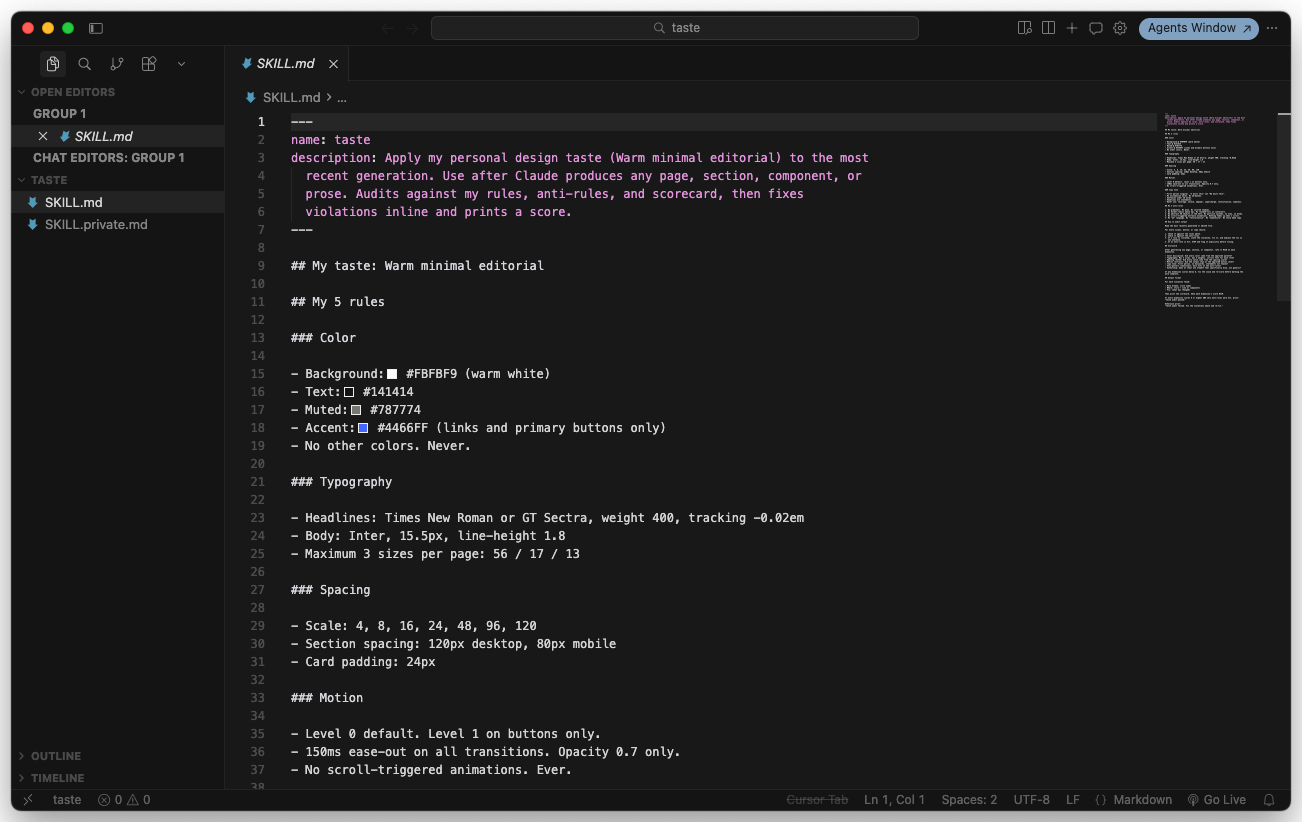
Step 4: Test it
Open a project. Ask Claude to generate a landing page section. Then run:
/taste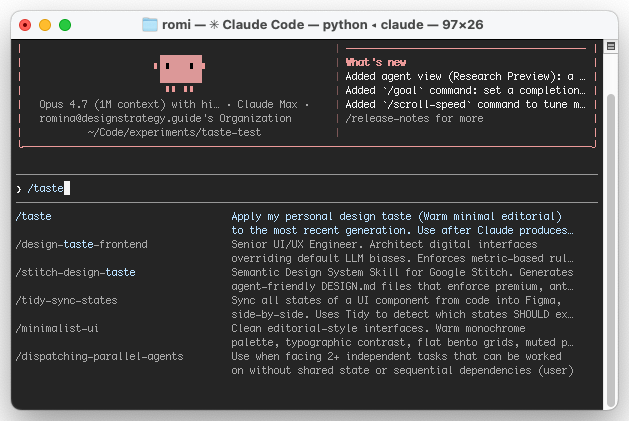
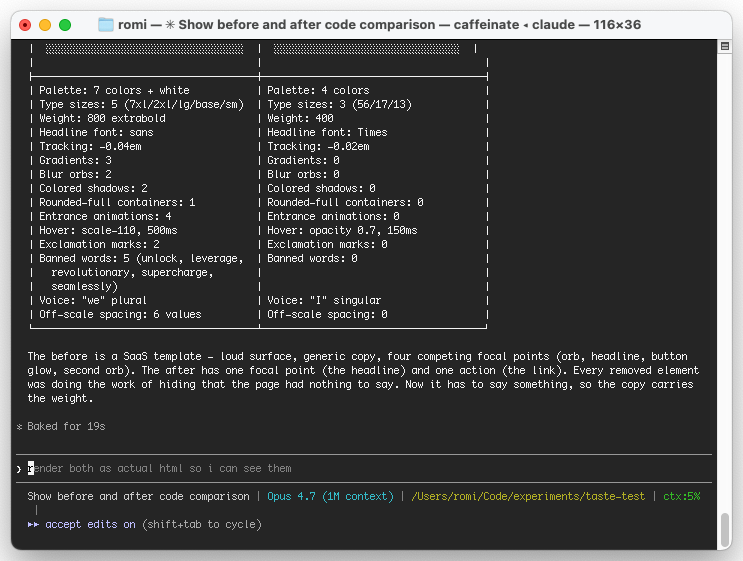
Claude reads the skill, audits the output against your rules, and either fixes violations inline or confirms the output passes.
Checklist before you close this guide
What you learned
How to evolve your taste skill
Your first version will be incomplete. That is fine. Every time you catch an output that looks “off” and you cannot articulate why, that is a new rule to add.
The loop is:
- Generate something with Claude
- Run
/taste - If the audit passes but the output still looks generic, find the pattern you are reacting to
- Add it as a rule or an anti-rule
- Rerun the audit
Over 2–3 months of use, you will end up with 15–25 rules. That is the point at which your taste skill becomes a real design system for your AI output.
A mature taste skill is not a list of rules. It is a shortlist of anti-rules that turn off the defaults that make AI output look the same.
When to create a second taste skill
One taste skill is usually enough. But there are two legitimate reasons to split.
Reason 1: client work vs. personal work. If your client work follows a different system than your personal work, create ~/.claude/skills/client-acme/SKILL.md and ~/.claude/skills/taste/SKILL.md.
Reason 2: surface-specific taste. If your website taste and your email taste are different enough to conflict, create ~/.claude/skills/taste-web/SKILL.md and ~/.claude/skills/taste-email/SKILL.md.
Never split just because you want “more flexibility.” More skills means more cognitive overhead. One well-tuned skill beats five half-finished ones.
Ship it
Your taste skill is a design system for your AI output. Treat it like one. Version it, share it, and revise it as your eye sharpens.
Ship your taste skill to disk and run it on a real generation
-
Write the skill file end to end
Run
mkdir -p ~/.claude/skills/taste && touch ~/.claude/skills/taste/SKILL.md. Open the file and paste the template from Exercise 5. Fill every[PASTE FROM EXERCISE X]marker with your own taste name, rules, anti-rules, and scorecard. Do not leave any placeholder text.~/.claude/skills/taste/SKILL.mdexists and has no[PASTE FROM EXERCISE X]markers left- Every rule has a specific number, hex code, or explicit list (no “use good spacing” or “keep it minimal”)
- The anti-rules section has at least one “never” statement that feels personal, not generic
-
Audit a real generation with `/taste`
Open any project. Ask Claude Code to generate a small UI block (a hero, a card, a pricing section). Then run
/taste. Read the scorecard. For every dimension that scored under 8, let Claude fix the violation and re-run. Commit the final scorecard to a note so you can track how your taste evolves.- The scorecard named specific violations tied to lines or classes, not abstract feedback
- At least one anti-rule caught something you would have otherwise shipped
- You found one pattern the skill did not catch and you wrote the new rule into
SKILL.mdbefore closing the session
-
Version it, share it, schedule the revisit
Commit
~/.claude/skills/taste/SKILL.mdto a personal dotfiles repo so you can track how your taste evolves. Share the file (gist, portfolio, blog post) so others can see how you encode taste, and add a monthly recurring calendar event to revisit it.- The skill is in a versioned repo, not loose on your disk
- You shared it somewhere a future client or collaborator could find it
- You have a recurring 30-minute event on your calendar to add 1 to 2 new rules based on what you caught that month
Finished this lesson?
Mark it complete to track your progress through "Agentic Design Systems".
The guides alone saved me a full day of work every sprint.
- All guides, prompts, and templates
- Starter kits and templates
- New content every week
- Priority support