How and Why I Use Manus as My Research Assistant
Manus is the only AI agent I trust to run research end-to-end without me babysitting every step. Here is how I use it, what it does well, and where I still verify by hand.
What you will need
Get set up in 5 minutes.
Free tier exists with limited credits. Paid tiers unlock more credits, scheduled tasks, and concurrent runs. Pricing changes often, check the live page.
The single most important input. Vague prompts get vague results. I cover how to write good ones below.
Manus is fast for an agent (10-30 min for most tasks) but slow compared to a chat. Send the task, do something else.
Why I picked Manus
Most AI tools want me in the loop. ChatGPT asks clarifying questions. Claude pauses for approval at every step. Cursor wants me to review every diff. That is fine for code. It is exhausting for research.
Manus is the first AI tool where I send a task and walk away. I come back to a finished report. No mid-flight approvals, no “should I continue?” prompts. The task either completes or I get a summary of what blocked it.
That single workflow change saves me hours every week.
What I actually use it for
I use Manus exclusively for research with manual verification. Not for writing, not for coding, not for design. Three patterns:
1. Artist or designer deep dives
Research the work of Kenya Hara. Find his published books, his major projects (especially Muji), his design philosophy in his own words, and his most-cited essays. Pull screenshots of work that illustrates his point of view.Manus pulls everything into a report with images. I then verify the quotes are real and check that the projects are attributed correctly. I trust nothing automatically.
2. Topic exploration before writing
Find everything published in the last 12 months about agentic design systems. Group by source type (newsletter, conference talk, GitHub repo, blog post). Surface the 10 most-cited or most-engaged pieces. Skip marketing copy.This becomes the source list for an article. Saves me a full afternoon of manual searching.
3. Competitive scans
Find every product currently selling AI workflows for designers. List them with: pricing model, audience, content depth, and one sentence on what makes them different. Skip anything that is just a single course or template.Same caveat: I verify. But the breadth I get back is what would take me 4-5 hours manually.
Why Manus works for this and other tools do not
| Tool | Approach | Why it falls short for research |
|---|---|---|
| ChatGPT | Chat with web search | Stops to ask clarifying questions, summarizes shallowly |
| Claude | Chat with web search | Same problem, but better written summaries |
| Perplexity | Search-first AI | Great for single questions, weak for multi-source synthesis |
| Manus | Agent that runs end-to-end | Completes the whole task, captures visuals, watches videos |
The differentiator is autonomy. Manus does not stop. It plans, executes, and reports. The other tools want me to be the agent. Manus is the agent.
What Manus does that other tools do not
Screenshots. It captures visual references during browsing and includes them in the report. Critical for design research where words alone fail.
Watches videos. It can pull the actual content from a YouTube video, not just the description. Massive for talks and tutorials.
Concurrent tasks. I can have multiple research tasks running at once. Send three, come back to three reports.
Scheduled tasks. I can set Manus to run a recurring task (e.g., “every Monday, scan for new design system case studies”). I have not used this much yet but it is useful for trend tracking.
Setting up a project and task (visual walkthrough)
Three clicks to get a research task running. Here is what each step looks like.
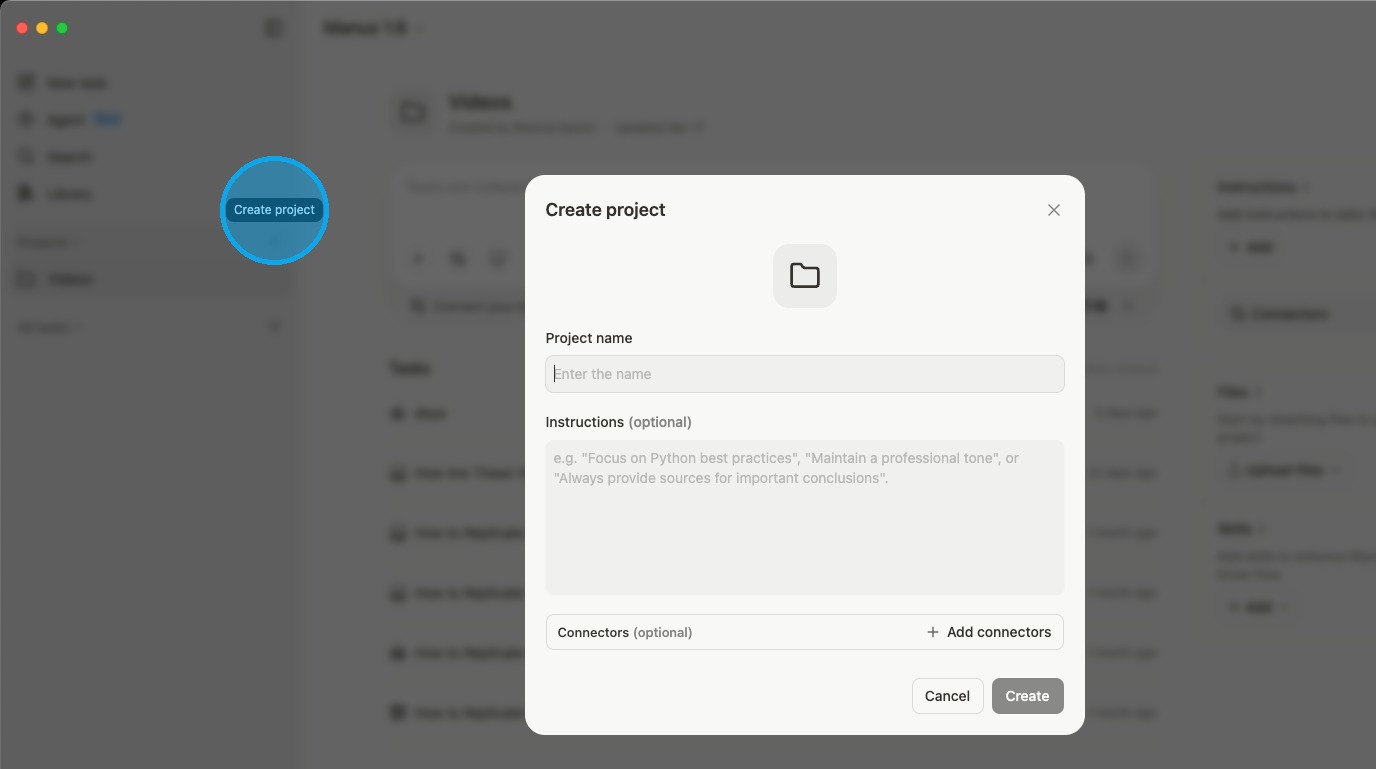
Step 1: Create a new project
Projects group related research tasks together. Click the create button in the sidebar.
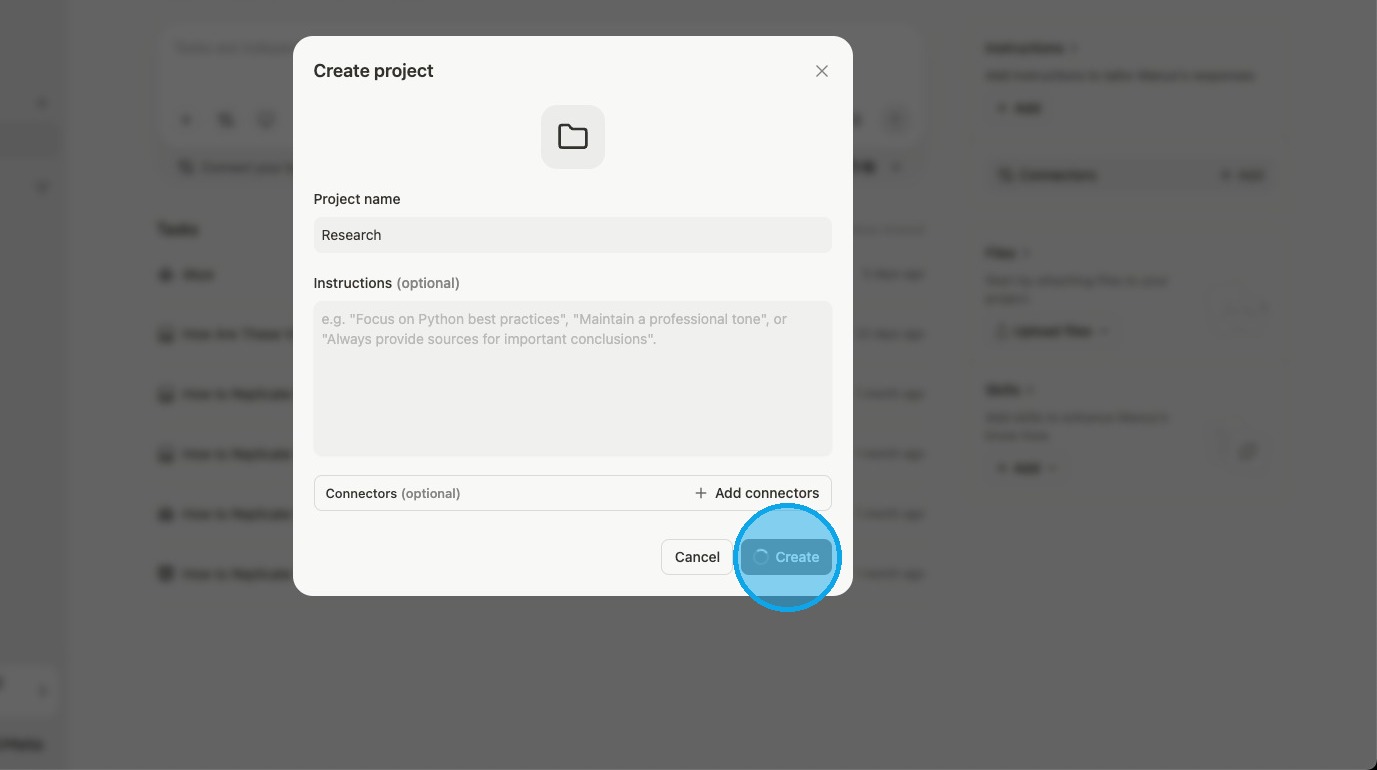
Step 2: Name the project
Pick a name that reflects the topic, not the specific task. I use one project per ongoing research area (e.g., “Agentic design systems”, “Token tooling”, “Design leadership”). Multiple tasks live inside.
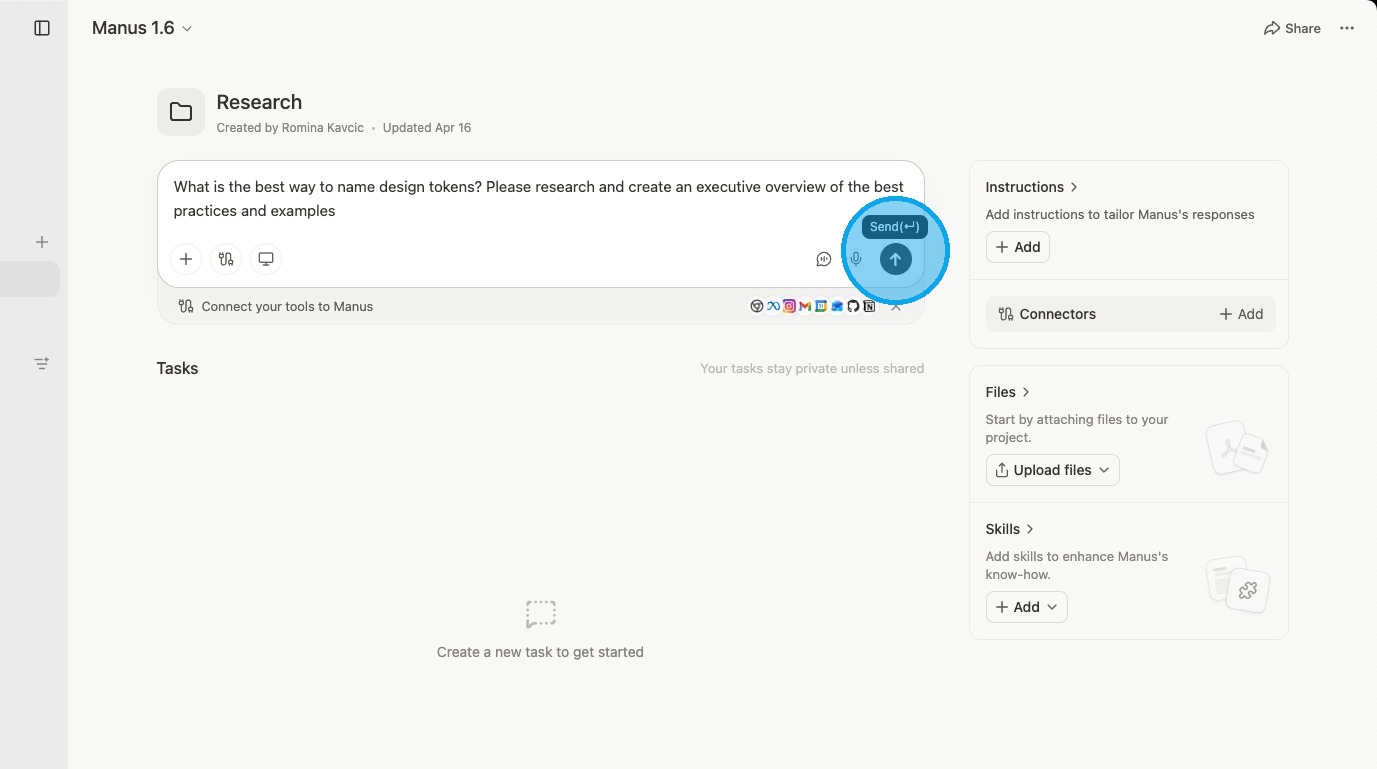
Step 3: Create a task
The task is where the actual prompt goes. This is what runs autonomously. Write the prompt with the precision pattern below, hit send, walk away.
How to write a Manus prompt that actually works
Bad prompt: “Tell me about design tokens.” Good prompt: “Find the 5 most-cited articles published in 2025 about design tokens and AI. For each one, give me: the author, the publication, a 3-sentence summary, the single most surprising claim, and one quote I could pull. Skip vendor blog posts.”
The pattern:
- Specific scope (“5 most-cited”, not “everything”)
- Time bounded (“published in 2025”)
- Structured output (“for each one, give me…”)
- Exclusions (“skip vendor blog posts”)
Manus thrives on precision. Spend an extra 60 seconds on the prompt and save 30 minutes on cleanup.
Where Manus still falls short (be honest with yourself)
- It hallucinates citations. Less than ChatGPT, but still. Always verify quotes and statistics manually.
- It is slow vs chat. A 30-second ChatGPT answer might be a 15-minute Manus task. Use it when depth matters more than speed.
- It cannot reason about your specific project. You cannot point it at a folder. It is a research tool, not Claude Code.
- Credits run out fast. Big research tasks burn through them. Budget accordingly.
- Visual quality varies. Screenshots are useful but not always high-resolution.
My weekly workflow with Manus
- Sunday night: I queue 2-3 research tasks for the week ahead.
- Monday morning: Reports are waiting. I skim, flag what looks worth checking.
- Throughout the week: I open the reports as I draft articles, design system content, or social posts.
- End of week: I send a “what is new this week” recurring scan to catch anything I missed.
Total time investment: ~15 minutes per week to queue tasks. Time saved: 4-6 hours.
What you get
After adopting this:
- A research workflow that runs while you do other work
- Better-sourced content because you have time to verify
- A growing reference library from your reports
- Confidence that you are not missing what is happening in your field
Common pitfalls
- Trusting the output without verifying. Manus is fast and convincing. It is also still an LLM that hallucinates. Verify quotes, statistics, and attributions every time.
- Vague prompts. “Research X” gets you generic. Always specify scope, format, and exclusions.
- Burning credits on small tasks. If a question takes 30 seconds in ChatGPT, do not send it to Manus. Save credits for tasks that need depth.
- Forgetting it is now part of Meta. Manus joined Meta. If you have data sensitivity concerns about that, factor it in.
Queue a Manus research task on a topic you actually need
-
Pick one real research question and write it the Manus way
Choose a topic you have been meaning to research but keep putting off. Write a prompt using the four-part pattern: specific scope, time bound, structured output, exclusions. Example: “Find the 5 most-cited articles published in 2025 about agentic design systems. For each, give me the author, publication, 3-sentence summary, most surprising claim, and one quote. Skip vendor blog posts.”
- Scope is a specific count or a bounded set, not “everything about”
- Time window is explicit (last 12 months, 2025, etc.)
- Output format is structured (per-item fields, table, list)
- At least one exclusion clause (“skip marketing copy”, “exclude vendor blogs”)
-
Send it to Manus, then verify before trusting
Open Manus, create or pick a project, paste the prompt as a task, hit send, and close the tab. Come back later. Read the report, then pick three claims at random and verify them manually: click the sources, confirm the quotes, check the attributions. Anything that does not check out gets a strike through in your notes.
- Report is structured the way the prompt asked for, not free-form prose
- Of the three claims you verified, at least two hold up to scrutiny
- You caught at least one issue (a misattributed quote, a stale link, a hallucinated stat). That is the reason the verification step exists.
Finished the last lesson?
Mark it complete to wrap up "Claude Code" on your dashboard.
The guides alone saved me a full day of work every sprint.
- All guides, prompts, and templates
- Starter kits and templates
- New content every week
- Priority support