Your Tokens Are a Prompt: Semantic Naming for AI UI Builders
When an AI builds your interface, the token name is the instruction. Why visual names like color.blue.500 make models guess, and how intent-based names make generation predictable.
What you will need
I have spent years naming tokens for the person sitting next to me. The goal was always the same: help a designer scan a Figma panel and find the right value fast. That naming served humans well. It quietly fails the newest reader of my design system, which is the model.
When an AI UI builder reads your tokens, the name is not a label. It is the instruction. A token called color.blue.500 tells the model nothing about where it belongs, so the model decides for itself. A token called color.action.primary.background tells it exactly where to go. Your token names have become prompts, and most systems are still writing them for the wrong reader.
Visual names describe what, not why
Look at the tokens most systems ship: color.blue.500, spacing.16, radius.lg, fontSize.xl. Every one of them describes appearance. None of them describes purpose. A human bridges that gap with judgment. A designer knows the primary button uses the brand blue, that destructive actions lean on red, that a compact card needs the tighter spacing step. The token does not say so. The designer just knows.
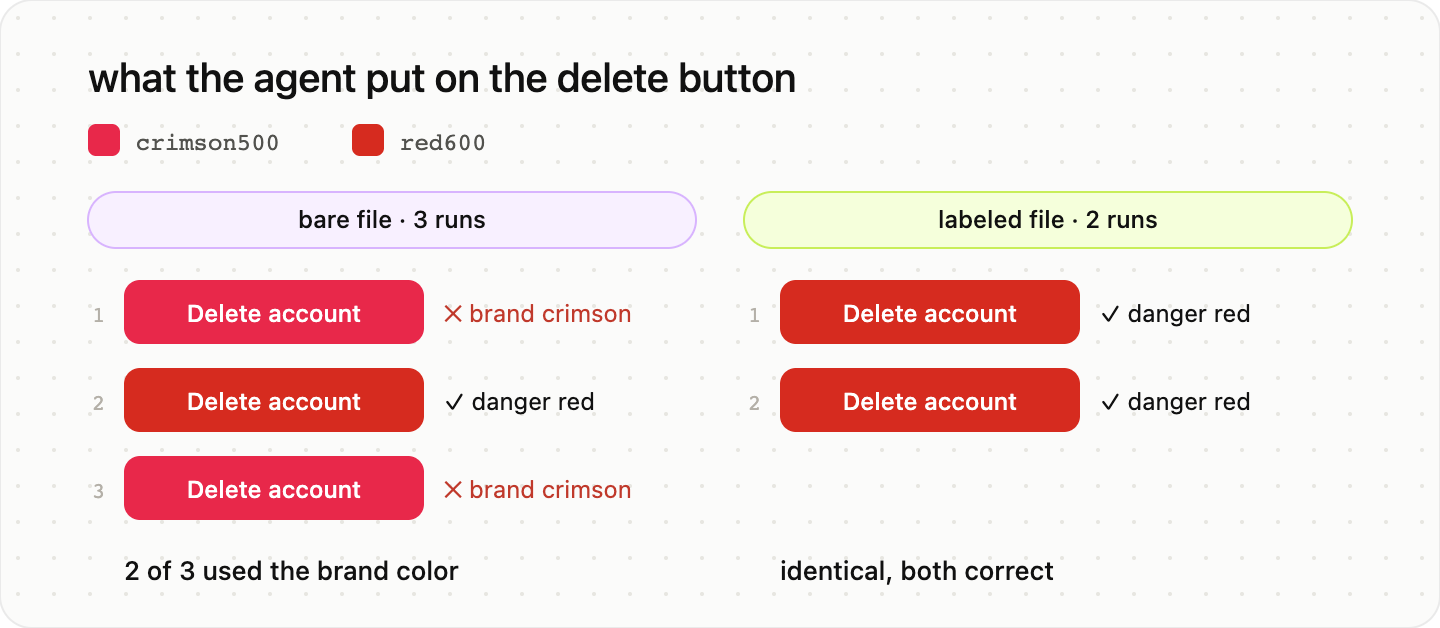
A model does not know. It pattern-matches on the name in front of it. Ask an AI builder to “make a destructive button” with only primitive tokens in scope, and it reaches for red.600 because the word destructive rhymes with red in its training, not because your system designated a danger token. It guessed, and it happened to guess in the same neighborhood as your intent. That is the part that fools people. The output looks close, so the naming problem stays invisible until the model guesses wrong in a place you were not watching.
When I read the raw token files of fifty design systems, this was the pattern underneath most of them: files that compile perfectly and still leave the agent to guess what each value means.
Encode the decision, not the value
The fix is to move the decision into the name. Semantic tokens carry intent:
color.action.primary.background
color.feedback.error.surface
space.layout.card.compact
motion.feedback.success.enter
content.tone.warning
Now “destructive button” has exactly one path. The request maps to color.feedback.error.* because the token says error, not red. The model is no longer interpreting your palette. It is reading your decisions back to you. When the brand color changes, or when error stops meaning red, the name still holds, and so does the generation.
This is the same shift the industry is making for human reasons, where tokens move from style values toward product semantics. AI raises the stakes. A loose name was a small tax on a teammate who could ask a question. It is a hard failure for an agent that cannot.
How a model actually consumes your tokens
It helps to picture what the AI does with the file. It does not see your Figma library or your brand intentions. It sees names and, if you provide them, descriptions. It performs a kind of retrieval: given a request, find the token whose name and description best match. Semantic names shrink that search and remove ambiguity. Visual names widen it and invite a guess.
The three-tier model still matters here. Primitives hold raw values. Semantic tokens assign meaning. Component tokens bind meaning to a part. The difference for AI is which layer you expose. If primitives are in scope when the model builds a component, you have handed it a box of paint and asked for a decision. Keep primitives out of the component layer, and the model can only choose among names that already mean something.
Write descriptions for the model, not the linter
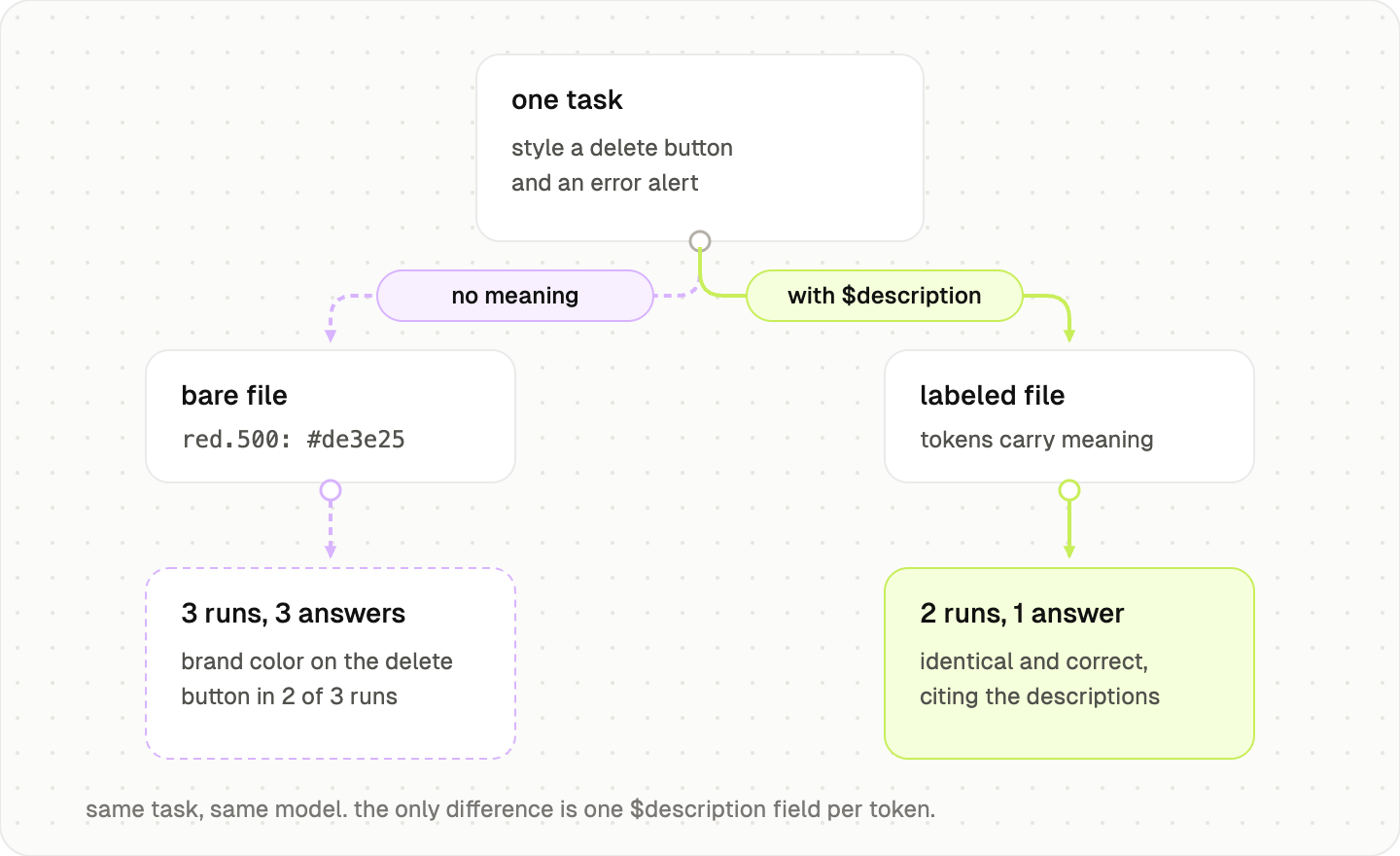
Most token files treat the description field as optional metadata. For AI, it is the highest-leverage field you have. The DTCG format gives you $description on every token. Use it as few-shot guidance.
{
  "color": {
    "feedback": {
      "error": {
        "surface": {
          "$value": "{color.red.600}",
          "$type": "color",
          "$description": "Background for destructive or error states. Use for delete confirmations and failed-validation banners. Do not use for general emphasis or links."
        }
      }
    }
  }
}
That one sentence does what a code comment does for an engineer and what an example does for a model. It states when to reach for the token and when not to. A linter ignores it. An agent reads it like onboarding. GitHub Primer already ships this: its tokens carry an org.primer.llm block with usage and do-not rules, written for exactly this reader.
Audit your tokens for AI readability
You do not need a migration to start. You need a pass with one question per token: would a capable stranger know where to use this from the name and description alone? Run through your set and check three things.
First, names. Every semantic token should state a purpose, not a hue or a pixel. If the name only survives because a human remembers the convention, the model will not.
Second, descriptions. Each semantic and component token needs a $description with a usage sentence and a do-not sentence. Empty descriptions are blind spots.
Third, exposure. Primitives should be invisible to the layer where components get built. If blue.500 is reachable, expect the model to reach for it.
The systems that work best with agents will not be the ones with the prettiest palette. They will be the ones whose names already explain themselves, because the same clarity that helps a new designer is the clarity an agent depends on. Tokens used to be documentation for people. They are becoming an API for everything that builds on top of your system, and names are the contract.
Done with this guide?
Mark it complete to track it on your dashboard.
Try with Prompts
Ready-to-use prompts related to this guide
Turn brand guidelines into design tokens, keeping what the brand guide states apart from the UI decisions the guide does not cover.
Map primitive colours to semantic roles, with the real foreground and background pairs each role is used in, calculated contrast, interaction states, and where not to use each token.
Check design token names against your own naming convention, and use values and references to catch tokens that bypass the semantic layer.